INWX Tools
Lizenzierung
- Primäre Lizenz: GPL-3.0-or-later
Sonstiges
- Spenden: Buy us a coffee
- Projektbetreuer: foundata
- Status: Stabil
Dieses Projekt nutzt eine andere Arbeitssprache als Deutsch. Der folgende Abschnitt wurde automatisch aus der README-Datei generiert und liegt daher nur in der Originalsprache vor.
README
Helper scripts and tools to administer, provision and/or manage tasks related to INWX, a well known professional domain provider.
⭐ Found this useful? Support open-source and star this project:

inwx-create-user.py
Helper to quickly create additional sub-user accounts.
Creates a sub-user account with parent account contact data as default, and optionally grants INWX roles:
./inwx-create-user.py --help
usage: inwx-create-user.py [-h] [--ote] [--api-url API_URL] [--language LANGUAGE] [--debug] [--json] [--force]
                           [--no-output-file] [--password [PASSWORD]] [--current-password [CURRENT_PASSWORD]]
                           [--generate-password] [--password-retries PASSWORD_RETRIES]
                           [--password-retry-delay PASSWORD_RETRY_DELAY] [--require-2fa] [--role-id ROLE_ID]
                           [--keep-full-access]
                           [--email EMAIL] [--title TITLE] [--firstname FIRSTNAME] [--lastname LASTNAME] [--street STREET] [--pc PC]
                           [--city CITY] [--cc CC] [--org ORG] [--voice VOICE]
                           username
Create an INWX sub-account and optionally grant roles.
positional arguments:
username              Username for the INWX sub-account to create.
options:
-h, –help            show this help message and exit
–ote                 Use the INWX OT&E test API. Default is production.
–api-url API_URL     Override API base URL, for example https://api.ote.domrobot.com.
–language LANGUAGE   INWX language code. Default: EN.
–debug               Print redacted XML-RPC call metadata to stderr.
–json                Print machine-readable result JSON.
–force               If the username already exists, update that sub-user's roles and password instead of failing.
–no-output-file      Do not write the created sub-user credentials file next to this script.
–password [PASSWORD]
Password for the new sub-account. If used without a value, prompt securely.
–current-password [CURRENT_PASSWORD]
Current password for an existing sub-account when using –force. If used without a value, prompt securely.
–generate-password   Generate and set a password for the new sub-account.
–password-retries PASSWORD_RETRIES
Retries for the initial password change after account.create. Default: 6.
–password-retry-delay PASSWORD_RETRY_DELAY
Seconds between initial password change retries. Default: 10.
–require-2fa         Set required2fa=1 for the sub-account.
–role-id ROLE_ID     Role id to assign. Repeatable. 20000 (Full Access), 20001 (Accounting), 20002 (Domain), 20003 (Hosting), 20004
(DNS), 20005 (Authcodes)
–keep-full-access    Keep INWX's default Full Access role. By default, Full Access is removed unless –role-id 20000 is explicitly
requested.
–email EMAIL         Sub-account email. Defaults to parent email.
–title TITLE         Sub-account title. Defaults to parent title.
–firstname FIRSTNAME
Sub-account first name. Defaults to parent first name.
–lastname LASTNAME   Sub-account last name. Defaults to parent last name.
–street STREET       Sub-account street. Defaults to parent street.
–pc PC               Sub-account postal code. Defaults to parent postal code.
–city CITY           Sub-account city. Defaults to parent city.
–cc CC               Sub-account country code. Defaults to parent country code.
–org ORG             Sub-account organization. Defaults to parent organization.
–voice VOICE         Sub-account phone number. Defaults to parent phone number.
Usage notes
API credentials are read from environment variables. If a variable is missing, the script prompts for it interactively:
export INWX_API_USER='...'
export INWX_API_PASSWORD='...'
export INWX_API_OTPSECRET='...' # optional unless the account requires 2FA
By default the script uses the production INWX API. Pass --ote for the INWX OT&E test API.
./inwx-create-user.py new-example-user --generate-password --role-id 20004
./inwx-create-user.py new-example-user --ote --generate-password --role-id 20001 --role-id 20004
./inwx-create-user.py new-example-user --password
./inwx-create-user.py existing-example-user --force --generate-password --current-password --role-id 20004
With --force, the script handles an existing visible sub-user by setting its role set to the requested roles. If --password or --generate-password is used for an existing sub-user, INWX usually requires the current sub-user password; pass it with --current-password, or use --current-password without a value to be prompted securely. Without --force, an existing username still fails with the INWX API error.
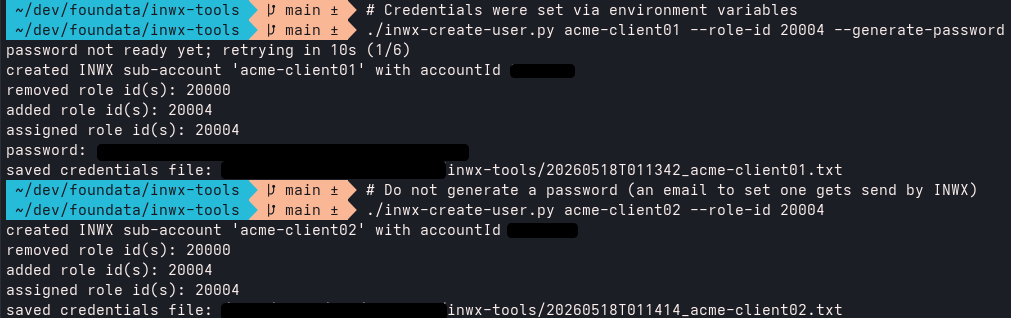
INWX creates sub-users with Full Access (20000) by default; this helper removes that role unless you explicitly pass --role-id 20000 or --keep-full-access. For ACME DNS-01 clients, pass --role-id 20004 to grant the DNS role to manage DNS resource records:
./inwx-create-user.py acme-client-example --role-id 20004
The helper copies the parent account contact data from account.info and uses it for the required account.create fields. Override individual fields when needed:
./inwx-create-user.py acme-example \
  --email "acme-admin@example.org" \
  --firstname "ACME" \
  --lastname "Automation" \
  --generate-password
For machine-readable output:
./inwx-create-user.py acme-example --generate-password --json
By default the script stores the created sub-user details next to the script as YYYYMMDDTHHMMSS_username.txt with file mode 0600. The file contains the created account id, role ids, and the INWX_API_USER / INWX_API_PASSWORD values for the sub-user when a password was set or generated. Disable that file with:
./inwx-create-user.py acme-example --generate-password --no-output-file
Important note on deleting users: As of 2026-Q2, user accounts cannot be fully deleted by the customer. When a user is created and later deleted via the Web UI or API, a new user with the same username cannot be created again afterwards, as the system will return code 2302: Object exists.
Deleting a user therefore only makes the account invisible and deactivates it; the user object still remains in the system. If the same username is absolutely required again, INWX Support must be contacted.
Licensing, copyright
Copyright (c) 2026 foundata GmbH (https://foundata.com)
This project is licensed under the GNU General Public License v3.0 or later (SPDX-License-Identifier: GPL-3.0-or-later), see LICENSES/GPL-3.0-or-later.txt for the full text.
The REUSE.toml file provides detailed licensing and copyright information in a human- and machine-readable format. This includes parts that may be subject to different licensing or usage terms, such as third-party components. The repository conforms to the REUSE specification. You can use reuse spdx to create a SPDX software bill of materials (SBOM).
Trademarks
- INWX® is a trademark of INWX GmbH, registered in Germany and probably other countries.
Author information
This project was created and is maintained by foundata. If you like it, you might buy us a coffee.
The INWX Tools project is not associated with INWX.