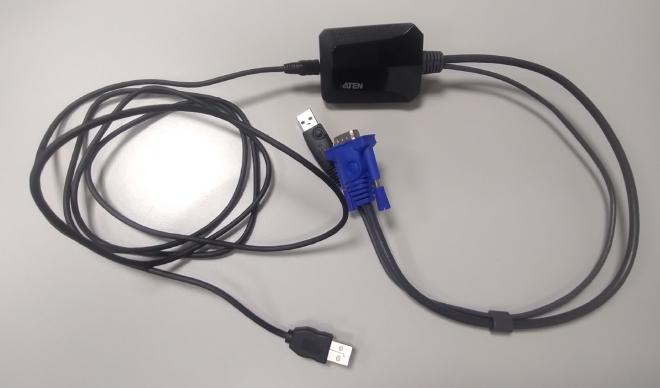
<?xml version="1.0" encoding="utf-8" standalone="yes"?><feed xmlns="http://www.w3.org/2005/Atom" xml:base="https://foundata.com/" xml:lang="en"><title>Aten on foundata</title><id>https://foundata.com/en/tags/aten/feed-atom.xml</id><link rel="self" type="application/atom+xml" hreflang="en" href="https://foundata.com/en/tags/aten/feed-atom.xml" title="atom"/><link rel="alternate" type="text/html" hreflang="en" href="https://foundata.com/en/tags/aten/" title="html"/><link rel="alternate" type="application/rss+xml" hreflang="en" href="https://foundata.com/en/tags/aten/feed-rss.xml" title="rss"/><link rel="alternate" type="application/atom+xml" hreflang="de" href="https://foundata.com/de/tags/aten/feed-atom.xml" title="atom, Deutsch"/><link rel="alternate" type="text/html" hreflang="de" href="https://foundata.com/de/tags/aten/feed-atom.xml" title="html, Deutsch"/><link rel="alternate" type="application/rss+xml" hreflang="de" href="https://foundata.com/de/tags/aten/feed-atom.xml" title="rss, Deutsch"/><updated>2024-07-11T01:34:00Z</updated><author><name>foundata GmbH</name><email>webmaster@foundata.com</email><uri>https://foundata.com/</uri></author><rights>© 2023-2026, foundata GmbH (https://foundata.com)</rights><icon>https://foundata.com/images/feed-icon.67ff83c698af1511552374e80cf5f6ff26d497ef21f04186cf058859d535ca75.svg</icon><logo>https://foundata.com/images/feed-logo.9138f24a120dabc7e3d34003662131cc9c7f2ff153ec39d2f6dea3a48c35b4bf.svg</logo><entry><title type="html">Using the ATEN CV211 (all-in-one KVM adapter) with Fedora Linux</title><id>tag:foundata.com,2024-05-16:/en/blog/2024/aten-cv211-kvm-linux/</id><published>2024-05-16T17:32:00Z</published><updated>2024-07-11T01:34:00Z</updated><link href="https://foundata.com/en/blog/2024/aten-cv211-kvm-linux/?utm_source=feed-atom" rel="alternate" type="text/html"/><link href="https://foundata.com/de/blog/2024/aten-cv211-kvm-linux/?utm_source=feed-atom" rel="alternate" type="text/html" hreflang="de"/><link href="https://foundata.com/en/blog/2024/copyleft-open-source-licenses/?utm_source=feed-atom" rel="related" type="text/html" title="Use copyleft licenses for open source or life with the consequences"/><author><name>Andreas Haerter</name><uri>https://andreashaerter.com/</uri></author><summary type="html"><![CDATA[<p>The <a href="https://www.aten.com/global/en/products/kvm/cable-kvm-switches/cv211/" target="_blank" rel="noreferrer noopener">ATEN CV211</a> is an all-in-one KVM (Keyboard, Video, Mouse) adapter that turns your laptop into a KVM console, combining the functionality of a wormhole switch, capture box, external DVD-ROM, keyboard, mouse, and monitor, all in one compact and convenient unit. I really like the hardware in daily operations, especially when I have to a takeover new environments with &ldquo;historically grown&rdquo; cabling. It is nice to have the ability to get the screen and keyboard control of a yet unknown server without hassle—all with a small USB adapter in your backpack:</p>]]></summary><content type="html" xml:base="https://foundata.com/"><![CDATA[<p>The <a href="https://www.aten.com/global/en/products/kvm/cable-kvm-switches/cv211/" target="_blank" rel="noreferrer noopener">ATEN CV211</a> is an all-in-one KVM (Keyboard, Video, Mouse) adapter that turns your laptop into a KVM console, combining the functionality of a wormhole switch, capture box, external DVD-ROM, keyboard, mouse, and monitor, all in one compact and convenient unit. I really like the hardware in daily operations, especially when I have to a takeover new environments with &ldquo;historically grown&rdquo; cabling. It is nice to have the ability to get the screen and keyboard control of a yet unknown server without hassle—all with a small USB adapter in your backpack:</p>
<figure><img class="mx-auto my-0 rounded-xs" alt="ATEN CV211 KVM switch: photo of the hardware"  srcset="/de/blog/2024/aten-cv211-kvm-linux/aten-cv211-hardware_hu_27b86746264c34e3.jpg 330w,/de/blog/2024/aten-cv211-kvm-linux/aten-cv211-hardware_hu_34e659018e260b1d.jpg 660w,/de/blog/2024/aten-cv211-kvm-linux/aten-cv211-hardware_hu_77d2773747ea3ca8.jpg 1024w,/de/blog/2024/aten-cv211-kvm-linux/aten-cv211-hardware_hu_5738ffbe0085dd1d.jpg 2x" src="/de/blog/2024/aten-cv211-kvm-linux/aten-cv211-hardware_hu_34e659018e260b1d.jpg"  loading="lazy"></figure><p>If you connect the adapter, you&rsquo;ll get a 10 MiB drive mounted with the following contents, containing a Microsoft Windows Client <code>WinClient.exe</code> (basically a Runtime Environment and wrapper) and the real application <code>JavaClient.jar</code>:</p>
<div class="highlight"><pre tabindex="0" class="chroma"><code class="language-bash" data-lang="bash"><span class="line"><span class="cl">$ ll
</span></span><span class="line"><span class="cl">total 9,1M
</span></span><span class="line"><span class="cl">drwxr-xr-x. <span class="m">2</span> user user  16K  1. Jan <span class="m">1970</span>  .
</span></span><span class="line"><span class="cl">drwxr-x---+ <span class="m">3</span> root root   <span class="m">60</span> 30. Apr 19:08 ..
</span></span><span class="line"><span class="cl">-rw-r--r--. <span class="m">1</span> user user 3,7M 30. Dez <span class="m">2019</span>  JavaClient.jar
</span></span><span class="line"><span class="cl">-rw-r--r--. <span class="m">1</span> user user 2,0M 30. Dez <span class="m">2019</span>  Vplayer.jar
</span></span><span class="line"><span class="cl">-rwxr-xr-x. <span class="m">1</span> user user 3,5M 30. Dez <span class="m">2019</span>  WinClient.exe
</span></span></code></pre></div><h2 id="the-login-failed-problem" class="scroll-mt-20 md:scroll-mt-24 wrap-break-word group/heading "><a href="#the-login-failed-problem" class="group-hover/heading:after:content-['#'] group-hover/heading:after:ml-1.5 group-hover/heading:after:text-content-400" id="the-login-failed-problem">The &ldquo;login failed&rdquo; problem</a></h2><p>The <code>JavaClient.jar</code> KVM console is mostly the same as ATEN uses for all their IP KVM stuff. They just bind the service to some high port on <code>localhost</code> and use the hardcoded credentials <code>-u administrator -p password</code> to connect (which is obvious in several places):</p>
<figure><img class="mx-auto my-0 rounded-xs" alt="ATEN CV211 KVM switch: credentials"  srcset="/de/blog/2024/aten-cv211-kvm-linux/aten-cv211-credentials-ghex_hu_722afafdfa6a6527.png 330w,/de/blog/2024/aten-cv211-kvm-linux/aten-cv211-credentials-ghex_hu_af19ab6c8cdd408b.png 660w,/de/blog/2024/aten-cv211-kvm-linux/aten-cv211-credentials-ghex_hu_e6e17435976d4060.png 1024w,/de/blog/2024/aten-cv211-kvm-linux/aten-cv211-credentials-ghex_hu_c6323a919321bd14.png 2x" src="/de/blog/2024/aten-cv211-kvm-linux/aten-cv211-credentials-ghex_hu_af19ab6c8cdd408b.png"  loading="lazy"></figure><p>Sadly, the Java application is not able to run out-of-the-box on a Fedora 40 Linux with OpenJDK / Java SE. The application will start but sometimes does not even list the device. And if there is a device to connect to, the login will fail:</p>
<figure><img class="mx-auto my-0 rounded-xs" alt="ATEN CV211 KVM switch: login failed with OpenJDK"  src="/de/blog/2024/aten-cv211-kvm-linux/aten-cv211-login-failed-linux-openjdk.png"  loading="lazy"></figure><p>The <code>JavaClient.jar</code> will not be able to connect with any supported OpenJDK or <a href="https://www.azul.com/downloads/" target="_blank" rel="noreferrer noopener">Azul Zulu Java RE</a>:</p>
<div class="highlight"><pre tabindex="0" class="chroma"><code class="language-bash" data-lang="bash"><span class="line"><span class="cl"><span class="c1"># incompatible Java version :-(</span>
</span></span><span class="line"><span class="cl">$ java -version
</span></span><span class="line"><span class="cl">openjdk version <span class="s2">&#34;17.0.9&#34;</span> 2023-10-17
</span></span></code></pre></div><h1 id="solution-oracle-jdk-7" class="scroll-mt-20 md:scroll-mt-24 wrap-break-word group/heading "><a href="#solution-oracle-jdk-7" class="group-hover/heading:after:content-['#'] group-hover/heading:after:ml-1.5 group-hover/heading:after:text-content-400" id="solution-oracle-jdk-7">Solution: Oracle JDK 7</a></h1><p>For anybody having the same problem, the following should help:</p>
<ol>
<li><strong>Use</strong> a copy of the <strong>Oracle JDK 7</strong> (the patch level does not matter) and the application will work without flaws.<sup id="fnref:1"><a href="#fn:1" class="footnote-ref" role="doc-noteref">1</a></sup></li>
<li>Make sure <strong>the current working directory is the USB mount point so the <code>.jar</code> files are in <code>./</code></strong>.</li>
</ol>
<p>For example, if you just extract <code>jdk-7u80-linux-x64.tar.gz</code> to <code>/tmp</code>, you can use the application as follows:</p>
<div class="highlight"><pre tabindex="0" class="chroma"><code class="language-bash" data-lang="bash"><span class="line"><span class="cl">tar -xvf jdk-7u80-linux-x64.tar.gz -C /tmp
</span></span><span class="line"><span class="cl"><span class="nb">cd</span> /run/media/user/disk <span class="c1"># or wherever the ATEN CV211 storage was mounted</span>
</span></span><span class="line"><span class="cl">sudo /tmp/jdk1.7.0_80/bin/java -jar ./JavaClient.jar
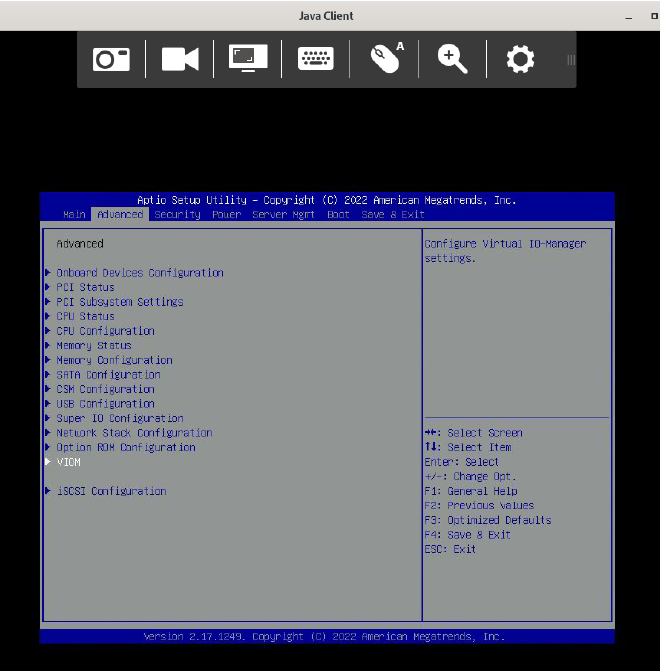
</span></span></code></pre></div><figure><img class="mx-auto my-0 rounded-xs" alt="ATEN CV211 KVM switch: screenshot of the working application"  srcset="/de/blog/2024/aten-cv211-kvm-linux/aten-cv211-working-with-jdk-7u80-linux-x64_hu_5925fb733328bd15.png 330w,/de/blog/2024/aten-cv211-kvm-linux/aten-cv211-working-with-jdk-7u80-linux-x64_hu_2f088b5d1449038e.png 660w,/de/blog/2024/aten-cv211-kvm-linux/aten-cv211-working-with-jdk-7u80-linux-x64_hu_aef664ead2cd8f80.png 1024w,/de/blog/2024/aten-cv211-kvm-linux/aten-cv211-working-with-jdk-7u80-linux-x64_hu_cb18726a350cfe9a.png 2x" src="/de/blog/2024/aten-cv211-kvm-linux/aten-cv211-working-with-jdk-7u80-linux-x64_hu_2f088b5d1449038e.png"  loading="lazy"></figure><p>You can <a href="https://www.google.com/search?q=download&#43;oracle&#43;jdk&#43;without&#43;account" target="_blank" rel="noreferrer noopener">download the Oracle JDK 7</a> from <a href="https://www.oracle.com/de/java/technologies/javase/javase7-archive-downloads.html" target="_blank" rel="noreferrer noopener">https://www.oracle.com/de/java/technologies/javase/javase7-archive-downloads.html</a>, but keep in mind to check the license conditions, especially if you are operating in a commercial environment.</p>
<h2 id="if-the-problem-persists" class="scroll-mt-20 md:scroll-mt-24 wrap-break-word group/heading "><a href="#if-the-problem-persists" class="group-hover/heading:after:content-['#'] group-hover/heading:after:ml-1.5 group-hover/heading:after:text-content-400" id="if-the-problem-persists">If the problem persists&hellip;</a></h2><p>Sometimes, the &ldquo;login failed&rdquo; error occurs even when following the procedure described above (i.e., when using Oracle Java and the current working directory is the mount point). I have not yet been able to determine the exact cause of these (rare) cases. However, this behavior has never occurred during operation but only during the first use. In such cases, a reboot of the hardware by unplugging and reconnecting it to the USB port always helped.</p>
<div class="footnotes" role="doc-endnotes">
<hr>
<ol>
<li id="fn:1">
<p>Do not use this old, unpatched Java RE for <em>anything</em> else because of known security vulnerabilities.&#160;<a href="#fnref:1" class="footnote-backref" role="doc-backlink">&#x21a9;&#xfe0e;</a></p>
</li>
</ol>
</div>
]]></content><category scheme="taxonomy:tags" term="aten" label="aten"/><category scheme="taxonomy:tags" term="aten-cv211" label="aten-cv211"/><category scheme="taxonomy:tags" term="kvm" label="kvm"/><category scheme="taxonomy:tags" term="java" label="java"/><category scheme="taxonomy:tags" term="fedora" label="fedora"/></entry></feed>
